


At a Glance: How to List Business on Google
- To list your business on Google, you need a Google account and a verified Google Business Profile. The whole setup process takes less than 30 minutes and costs nothing.
- Creating a Google account for business is the first step. You can set up a dedicated business account with a Gmail or an existing non-Gmail address. Either works.
- A verified Google Business Profile gets your business into local search results and onto Google Maps. Unverified listings miss out on these placements.
- Adding photos, videos, and regular updates to your profile lifts your visibility in local search and builds trust before a customer contacts you. Active profiles consistently outperform dormant ones in Google’s local rankings.
- Ongoing Google Business Profile optimisation is what keeps you ahead of competitors once your profile is live. Getting listed is the start, but what you do after that determines if people find you or not.

Most people won’t call a business they can’t find on Google. No listing means no reviews, no photos, no proof you’re open, and for a lot of potential customers, that’s enough reason to move on to the next result.
Knowing how to list business on Google is the fastest way to show people you’re the real deal.
Why Should You List Your Business On Google?
Local search is a common way Australians find nearby products and services. A search pulls up a map pack (those prominent business listings that appear before organic results), and if you’re not listed, you don’t appear there at all.
Around 98% of consumers have used the internet to find information about local businesses in the past year, with Google being the dominant platform.
A Google Business Profile is free and gives your business a presence across Google Search and Google Maps simultaneously. Customers see your address, phone number, opening hours, reviews, and photos before they reach your website. For many businesses, the profile itself closes the deal.
The visibility benefit compounds once you start gathering reviews. Businesses with recent, positive reviews consistently rank higher in local results, and consumers trust them at the same rate as personal recommendations.
How to Create a Google Account for Business
To list your business on Google, you first need a Google account. If your business already uses Gmail or Google Workspace, you can use that account.
Starting fresh? Here’s how to create a Google account for business.
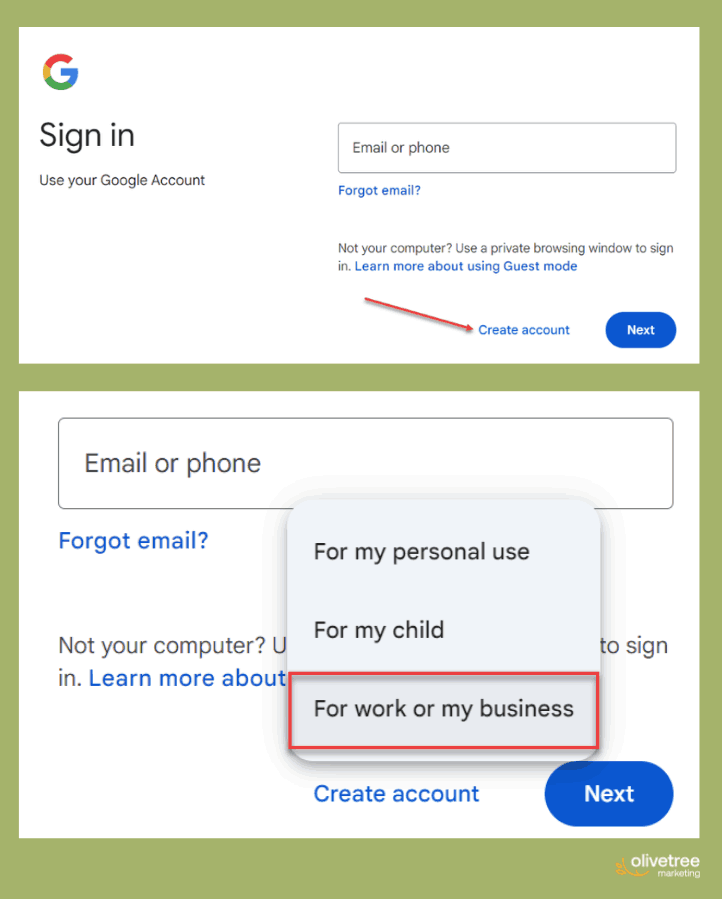
1. Go to accounts.google.com and click “Create account.
Then, choose “For my business” from the options.
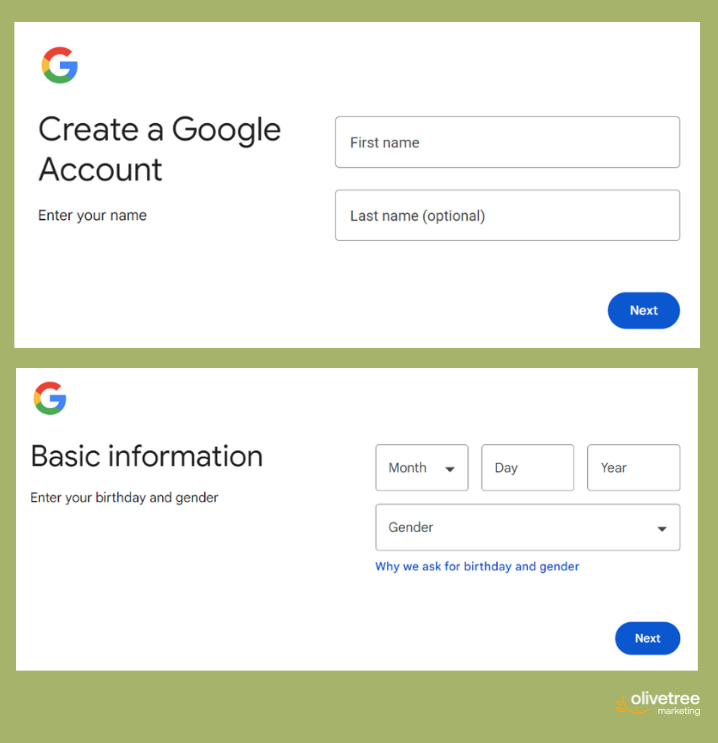
2. Fill in your name and basic information.
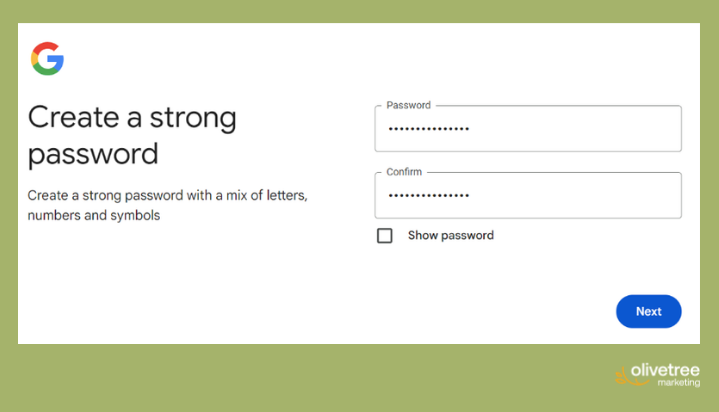
3. Choose an email address, and set a password.
Note: This can be done even with a non-Gmail account.
4. Complete the SMS verification step.
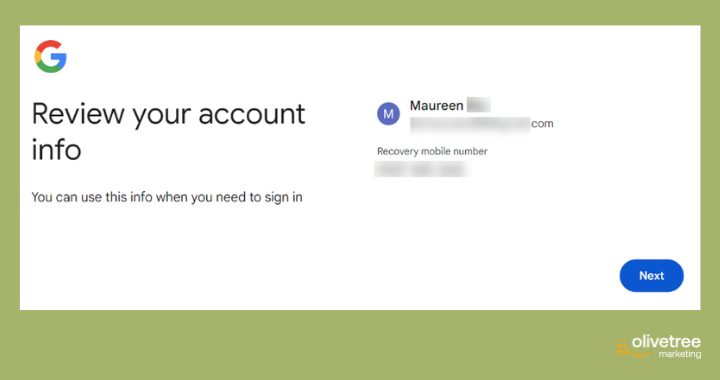
Once your account is active, go to business.google.com to start building your Google Business Profile.
Step-by-Step: How to List Your Business on Google
If you’ve never listed your business anywhere online, Google Business Profile is the right place to start. It carries the most weight in local search and feeds information to Google Maps, Google Search, and Google’s Knowledge Panel.
After completing your Google listing, consider submitting to other Australian directories such as True Local and Yellow Pages.
Reminder: Consistent name, address, and phone number details across all platforms strengthen your local SEO signals and help Google trust the accuracy of your information.
Step 1: Search for your business
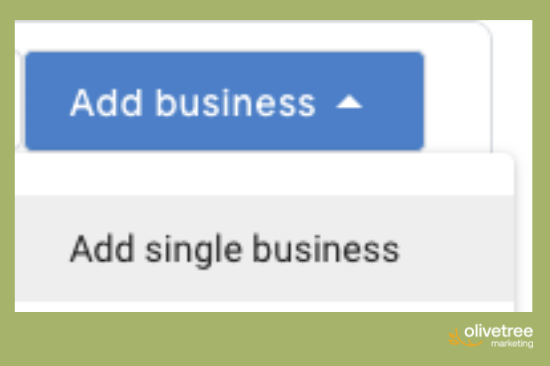
At business.google.com, type your business name into the search bar. Google checks whether a listing already exists. If it does, you can claim and verify it rather than create a duplicate. If not, proceed to the next step.

Step 2: Enter your business details
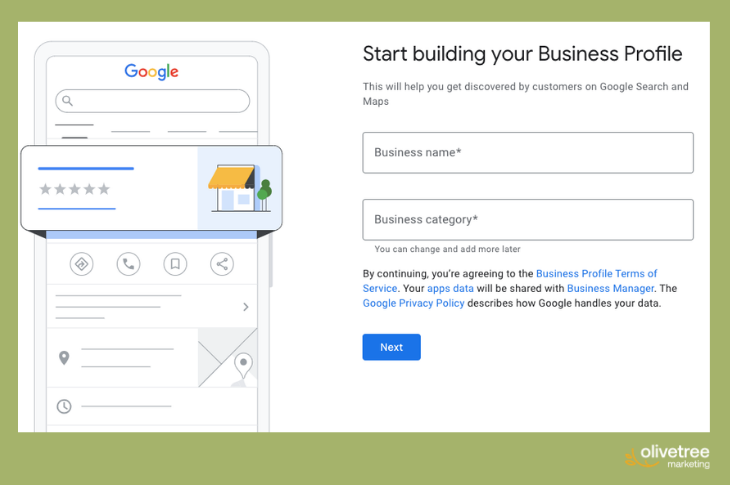
Add your business name, primary category, and physical address. Service-area businesses like plumbers or cleaners can hide their address and list the suburbs or regions they cover instead.
Step 3: Add website and contact information
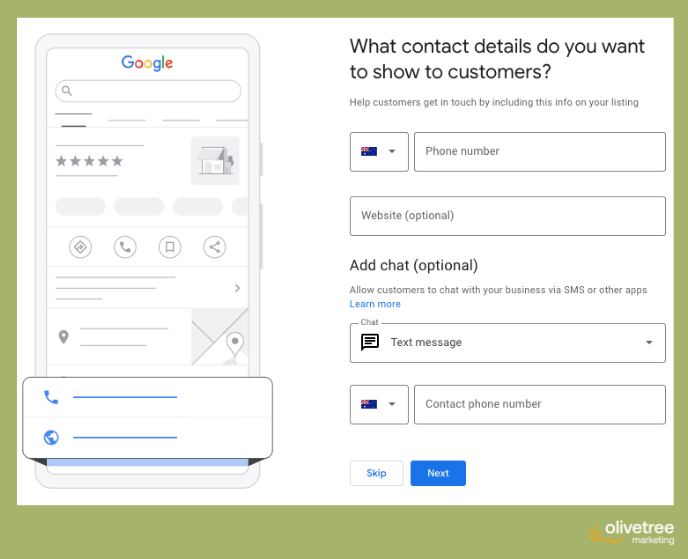
Include your phone number and website URL. Both appear directly on your profile, making it easy for customers to reach you without visiting your site first. These small details have a real effect on how many searchers convert into enquiries.
Step 4: Verify your listing
Google requires verification before your profile goes live. Until verification is complete, your listing won’t appear in search results. It can be through SMS, video, email, and many more.
Step 5: Complete your profile
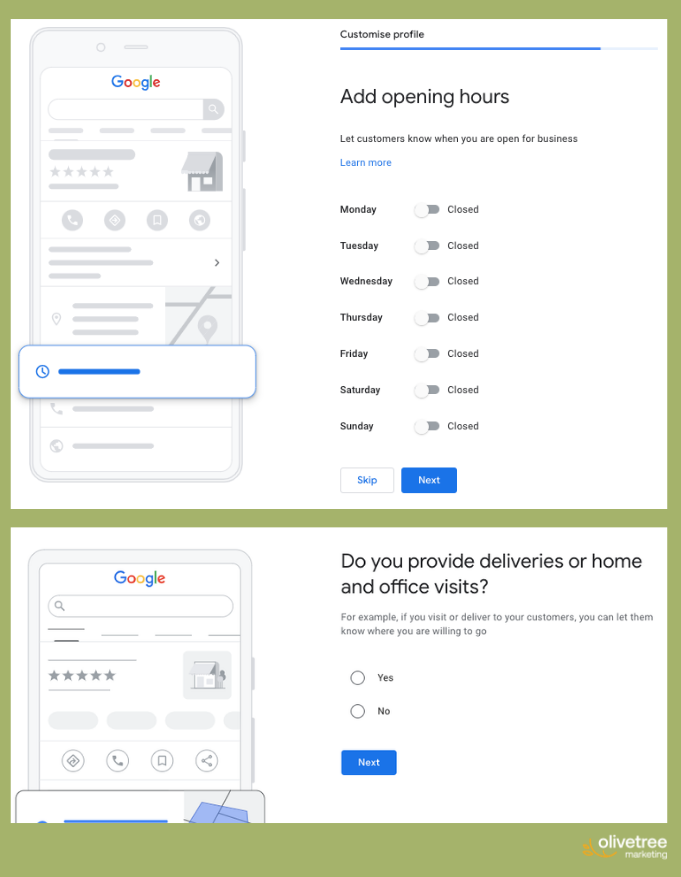
After verification when you list business on Google, fill in every section, including:
- Opening hours
- Business description
- Services or products
- Relevant attributes (accessibility features, payment options, or booking availability, wheelchair access, free wifi, etc)
Step 6: Advertise
If you wish, you may advertise on Google.
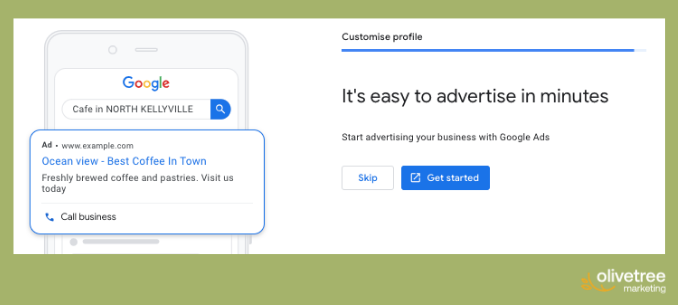
A complete profile ranks higher and converts more searchers into customers. Google’s own data shows that businesses with complete profiles are twice as likely to be considered reputable. See Google’s Business Profile for the full breakdown of what to include.
What Are the Benefits of Having a Verified Business Profile on a Local Search Service?
Verification is the difference between a listing that builds trust and one that raises doubt.
It tells Google the business is legitimate and the owner has confirmed its details. Unverified listings can be edited by anyone, which creates a real risk of incorrect information appearing in search results.
A verified profile unlocks the full suite of Google Business Profile features, or the ability to respond to reviews, post updates, access performance insights, and add visual content. Businesses with verified profiles also rank higher in local map results compared to unverified competitors in the same area.
How to Add Photos and Videos to My Business Profile on a Digital Listing Service?
Log in to your Google Business Profile dashboard at business.google.com and select the location you want to update.
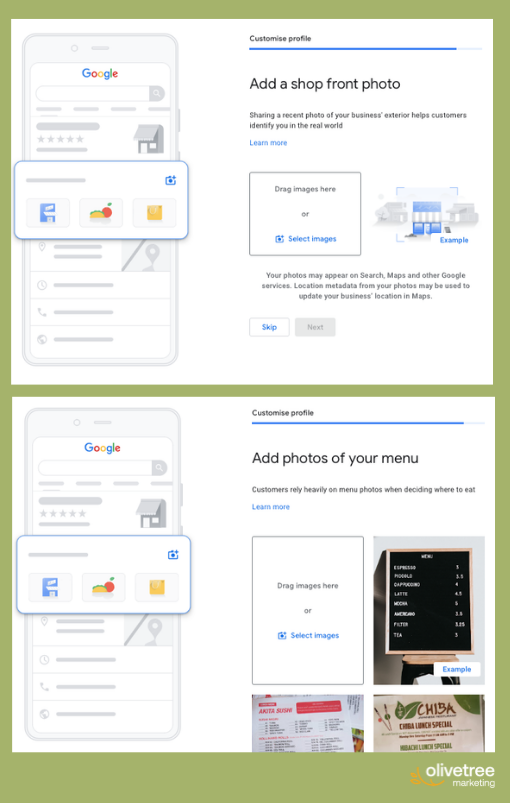
Click “Add photo” and choose from categories such as exterior or interior shots, or product images. JPG or PNG files under 5 MB work best, and Google recommends a minimum resolution of 720 x 720 pixels.
Start with at least five photos spread across different categories. Profiles with photos receive significantly more direction requests and website clicks than those without them, so even a handful of quality images makes a measurable difference from day one.
You may also add photos of your menu, services, and other relevant content.
Note: You may do this step as you’re registering your account on Google Business.
What To Post Regularly On Your Google Business Profile
Google rewards active profiles. Beyond photos and videos, you can publish Google Posts, which are short updates that appear directly on your listing. Use them for new services, seasonal promotions, or recent project highlights.
Aim to post at least twice a month and refresh your cover photo every few months to keep the profile current.
Encourage customers to leave reviews and respond to every one, positive or negative. Consistent engagement signals to Google that your business is active, which influences your position in local results.
Frequently Asked Questions
Can I integrate appointment booking features into my online business profile?
Yes, for eligible businesses. Google’s native booking feature, called Reserve with Google, lets customers book directly from your listing without leaving Google.
Eligible categories include dining, beauty, fitness, home services, and financial services. Medical clinics, dentists, and most professional services are currently excluded.
To check whether your business qualifies:
- Log into your Google Business Profile dashboard at business.google.com.
- Click “Edit profile.”
- Look for a “Bookings” section in the menu. If it appears, your business is eligible.
- Select “Get started,” choose a supported scheduling provider, and follow the prompts.
- Your booking button goes live on your listing within approximately one week.
If Reserve with Google isn’t available for your category, you can still add a direct booking URL manually under the “Appointments” field in your profile.
How can I update my business hours and contact details on my online profile?
- Go to business.google.com and sign in to your account.
- Select the listing you want to update.
- Click “Edit profile.”
- Select the “Hours” tab to update your regular hours or add special hours for public holidays.
- To update your phone number or website, go to “Contact” within the same Edit profile menu.
- Click “Save” after each change.
Changes typically go live within minutes. Google will sometimes prompt you to confirm hours ahead of Australian public holidays, and it’s worth accepting those prompts to keep your listing accurate.
Which services offer reputation management for online business profiles?
Dedicated tools like Birdeye and Podium let businesses monitor and respond to reviews across multiple platforms from one dashboard. For a single location, managing reviews directly through Google Business Profile costs nothing and covers the platform where most customers leave feedback.
If you’d rather have someone handle it as part of a broader strategy, Olivetree Marketing works with small businesses on local SEO and profile management.
How to find a service to manage multiple business locations’ online profiles?
Google’s own tools handle multi-location management at no cost:
- Go to business.google.com and sign in.
- Select “Add profile” then “Import profiles” to access the bulk upload feature.
- Download Google’s CSV template, fill in your location details, and upload the file.
- Review any errors flagged by Google and correct them before verification.
- Use Business Profile Manager to assign team members to specific locations or location groups.
Note: Bulk upload when you list business on Google is available for businesses with 10 or more locations. For businesses with fewer locations, managing each profile individually through the dashboard is the standard approach. For ongoing management across multiple locations, including review responses, post-scheduling, and local SEO, agencies like Olivetree Marketing handle this on behalf of clients.
What are the best strategies to optimise a local business listing for better online visibility?
- Fill in every section of your profile. Incomplete profiles rank lower than complete ones.
- Choose the most specific primary category available for your business type.
- Make sure your business name, address, and phone number match exactly across all directories where you appear.
- Add at least five photos and refresh them regularly. Profiles with photos receive more clicks and direction requests.
- Publish Google Posts at least twice a month to signal an active, current profile.
- Respond to every review, positive or negative.
- Consistently build customer reviews over time.
How to create a new online business listing for my cafe?
- Go to business.google.com and sign in with your Google account.
- Click “Add profile” and search for your café name to check whether a listing already exists.
- If no listing exists, select “Add your business to Google” and enter your café name.
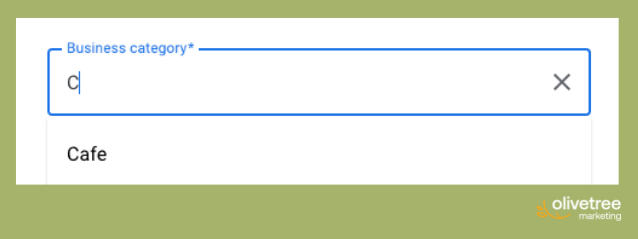
- Choose “Café” or “Restaurant” as your primary category. Pick whichever is the closer match to your offering.
- Enter your address, phone number, and website.
- Complete the verification step (most cafés verify by postcard or phone).
- Once verified, upload photos of your space, food, and menu, set your opening hours, and write a short business description.
Get More From Your Google Listing

Listing your business on Google is a solid foundation, but consistent optimisation is where the real results come from.
Competitors in your area are actively managing their profiles, gathering reviews, and posting updates.
Olivetree Marketing helps Australian small and medium businesses list business on Google. This way, you can grow through local SEO services built around what works in local search. If you want more customers to find you before your competitors, get in touch with Olivetree Marketing today.